
Release notes
Releases summary
Configuration and management portal https://yourbourse.cloud.
26.11.4
08 Nov 2026What's new
-
We have added a new MT4 Bridge parameter, Liquidity pools to statuses mapping, which routes an order to a virtual liquidity pool based on the client's account status. You no longer need to move clients between groups just to allow or block instruments for them. Status patterns support wildcards, comma-separated lists and
!negation, in the same format as the existing group and account mappings. The parameter is available for MT4 Bridges only.New endpoints:
POST
/api/v1/config/bridge/profile/parameter/vlp-status
POST/api/v1/config/bridge/profile/parameter/vlp-status/reset
DELETE/api/v1/config/bridge/profile/parameter/vlp-status -
We have added percentage hedging to the liquidity pool mapping parameters on MT4 Bridge profiles. You can now split the order flow of a group, an account or an account status across several virtual liquidity pools by percentage — for example 60% to one pool and 40% to another — which was previously possible on MT5 Gateway profiles only. The liquidity pools-to-statuses mapping supports the same split.
Updated endpoints:
POST
/api/v1.0/config/bridge/profile/parameter/vlp-status— each mapping now accepts an optionalhedgingPercent(1–100)POST
/api/v1.0/config/bridge/profile/export
POST/api/v1.0/config/bridge/profile/import— the "LP to statuses mapping" sheet gains aHedging %column -
We have improved the hedging distribution in the Liquidity pools to accounts, groups and statuses mappings of MT4 Bridge and MT5 Gateway profiles. Each account, group list or status list can now have its own split across liquidity pools, and the same pool can appear in several rows. Before, all hedging rows had to share the same targets. For example, you can now split account 1002 50/50 and account 1003 80/20 between the same two pools.
Updated endpoints:
POST
/api/v1/config/bridge/profile/parameter/vlp-account
POST/api/v1/config/bridge/profile/parameter/vlp-group
POST/api/v1/config/bridge/profile/import
Bug fixes
- We have fixed an issue where moving a symbol's primary liquidity pool to a pool on another matching engine left the symbol under the old matching engine.
26.11.136
06 Nov 2026Bug fixes
- We have introduced a safer start-up for the MT5 Floating Leverage plugin: an open position or client group it cannot read is now logged and skipped, and all other open positions load normally.
26.11.136
06 Nov 2026Bug fixes
- We have fixed an issue where a price (quote) session that exposes the same underlying instrument under two FIX symbols — for example a raw feed and a marked-up feed — only received prices for one of them. Both feeds now stream correctly, each with its own markup.
26.11.136
06 Nov 2026Misc
- We have introduced end-client identification on IS Prime and Match Trade orders that arrive through a FIX session, so these liquidity providers now see the end client's account instead of one shared account for the whole session.
Reporting & Risk Management portal https://yourbourse.cloud.
26.11.2
05 Nov 2026What's new
-
We have added alerts. Any report you can schedule can now also run as an alert: you set a condition on the report's data, such as total profit per symbol above a threshold, and you are notified only when the condition is met.
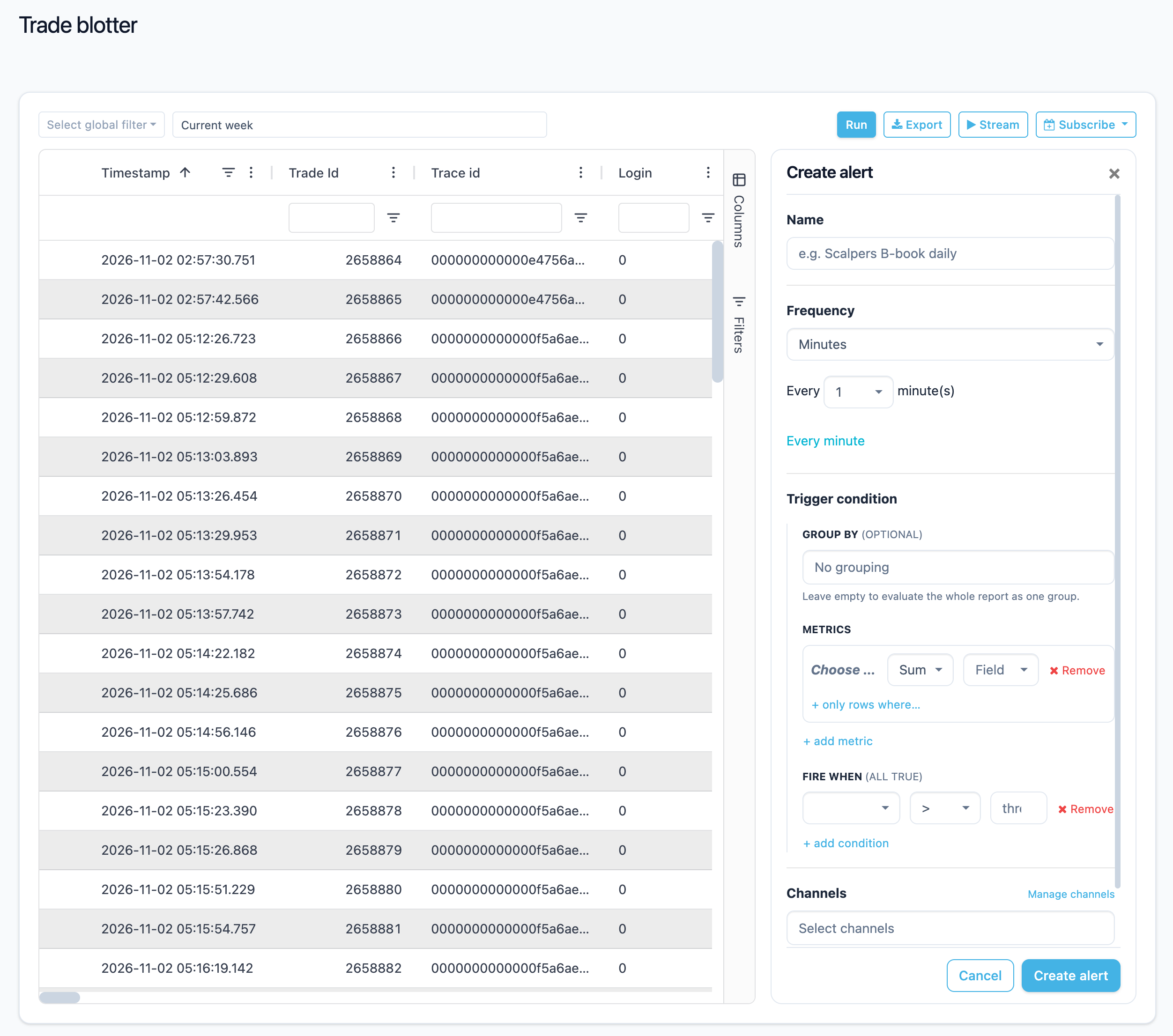
New endpoint (lists the report columns an alert condition can use):
POST
/api/v1/report/management/alert-columnsUpdated endpoint (each report type now returns
alertReportModel):POST
/api/v1/report/management/types -
We have added notification channels: Email, Custom SMTP (your own mail server), SFTP, Webhook (for example, Slack), and Telegram. Set them up once on the new Notification channels page in the profile menu, and use Test to check each one. The Email channel sends up to 100 messages a month; use Custom SMTP for more.
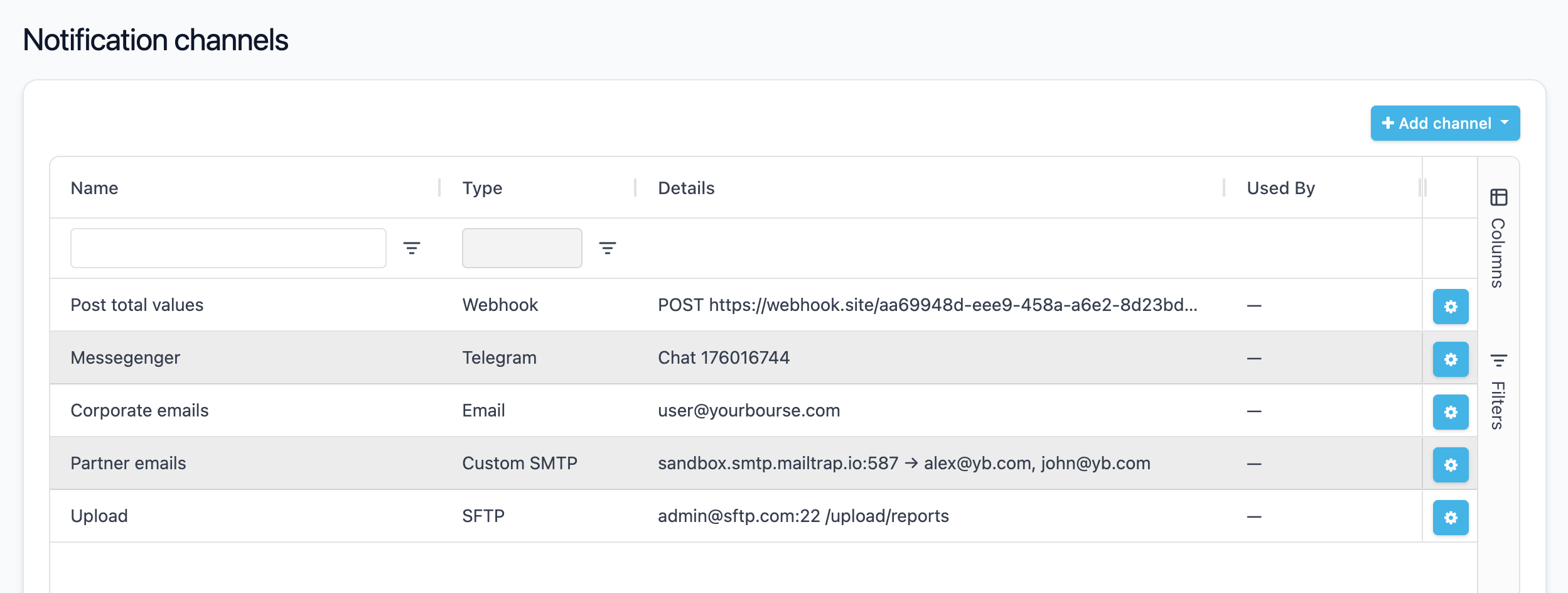
New endpoints:
POST
/api/v1/report/alerting/channels/all
POST/api/v1/report/alerting/channels/webhook
POST/api/v1/report/alerting/channels/telegram
POST/api/v1/report/alerting/channels/email
POST/api/v1/report/alerting/channels/custom-smtp
POST/api/v1/report/alerting/channels/sftp
POST/api/v1/report/alerting/channels/webhook/details
POST/api/v1/report/alerting/channels/telegram/details
POST/api/v1/report/alerting/channels/email/details
POST/api/v1/report/alerting/channels/custom-smtp/details
POST/api/v1/report/alerting/channels/sftp/details
POST/api/v1/report/alerting/channels/webhook/test
POST/api/v1/report/alerting/channels/telegram/test
POST/api/v1/report/alerting/channels/email/test
POST/api/v1/report/alerting/channels/custom-smtp/test
POST/api/v1/report/alerting/channels/sftp/test
POST/api/v1/report/alerting/channels/email/usage
DELETE/api/v1/report/alerting/channels -
We have replaced the Subscribe form on report pages with a schedule panel. Scheduled reports and alerts are now delivered through notification channels, so create a channel first to receive reports by email or SFTP.
Updated endpoints (each one now accepts
deliveryChannelIds, an optionalconditionon reports that support alerts, and an optionaloperationIdthat updates an existing schedule instead of creating one):POST
/api/v1/report/daily/schedule
POST/api/v1/report/fix-message/schedule
POST/api/v1/report/maker/historical-position/schedule
POST/api/v1/report/maker/open-position/schedule
POST/api/v1/report/markouts/schedule
POST/api/v1/report/markouts/aggregated/schedule
POST/api/v1/report/open-position/schedule
POST/api/v1/report/order-blotter/schedule
POST/api/v1/report/regulatory/cappitech/schedule
POST/api/v1/report/regulatory/emir/schedule
POST/api/v1/report/regulatory/end-of-date-price/schedule
POST/api/v1/report/regulatory/mifir/schedule
POST/api/v1/report/spread-analysis/schedule
POST/api/v1/report/spread-markup-revenue/schedule
POST/api/v1/report/swaps/schedule
POST/api/v1/report/taker/historical-position/schedule
POST/api/v1/report/ticks/maker/aggregated/schedule
POST/api/v1/report/ticks/maker/raw/schedule
POST/api/v1/report/ticks/taker/schedule
POST/api/v1/report/trade-blotter/schedule
POST/api/v1/report/trade-execution/schedule
POST/api/v1/report/volume/schedule
POST/api/v1/report/volume-analytics/schedule
POST/api/v1/report/winrate/scheduleYour existing scheduled reports keep their email and SFTP delivery. When you edit one of them, you choose a channel, and it replaces the old email or SFTP delivery.
-
We have rebuilt the Scheduled reports page. Alerts and scheduled reports are listed together, and you can edit, pause, resume, and delete them, and open each one's latest runs.
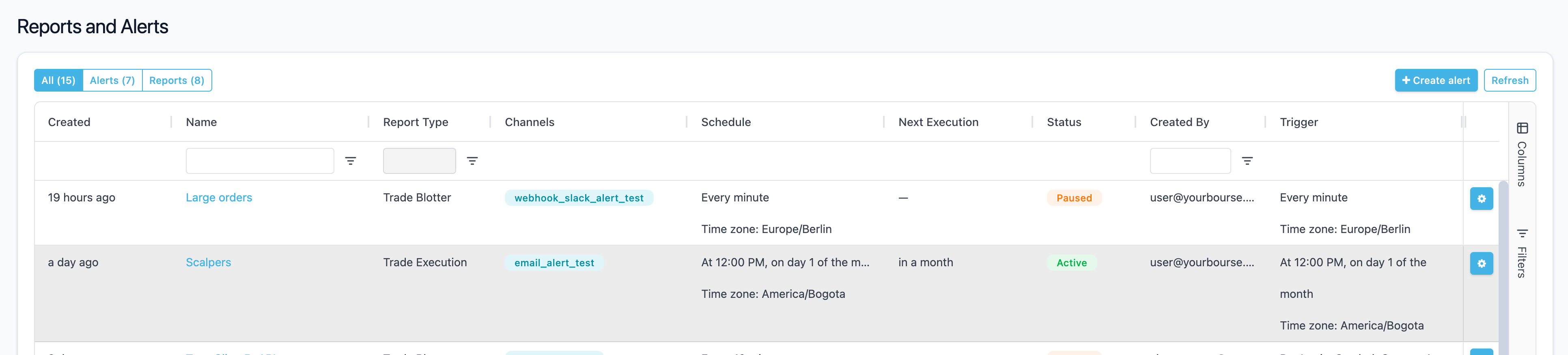
New endpoints:
POST
/api/v1/report/management/subscriptions/details
POST/api/v1/report/management/subscriptions/pause
POST/api/v1/report/management/subscriptions/resumeUpdated endpoint (each schedule now returns its channels and condition):
POST
/api/v1/report/management/subscriptions -
We have rebuilt the Running & Completed page. Each run shows the channels, condition, and timing it ran with.
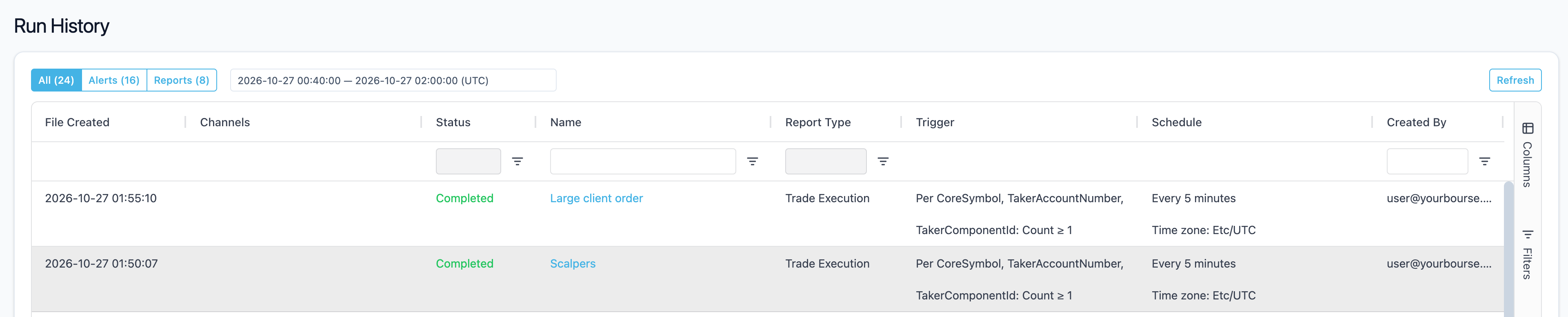
Updated endpoint (each run now returns its channels and condition, and the request accepts
scheduleOperationId):POST
/api/v1/report/management/recent - We have added a notice to the legacy alert pages, which will be retired, and a wizard that recreates the four legacy alerts as new alerts.
- We have removed the Upload to SFTP button from the AFM Trade Summary report. Schedule the report to an SFTP channel instead.
Misc
- We have added the Volume Analytics report to the dashboard widgets. The widget shows the report's summary tiles above the grid; to hide them, edit the dashboard, open the widget's settings and add
?showSummary=falseto its URL. To show only the tiles, add?showDetails=falseinstead. Groups in the report now start collapsed, and the right-click menu can expand or collapse all of them.
26.11.57
05 Nov 2026What's new
- [Breaking Changes] One export pipeline per entity — The export now accepts only one pipeline per entity: if the export configuration has a second entry for the same entity, the server logs "cannot create export pipeline" and does not start that entry. Before upgrading, merge any duplicate entries so that each entity has a single pipeline.
- Open position export to ClickHouse — Open positions can now be exported to ClickHouse through a new
positionexport entity. A record is sent whenever a position changes, and the optionalproducer_config.throttle_interval_mssetting limits how often price revaluations are exported per position. A full snapshot of open positions can be requested through the admin export snapshot endpoint withentityType: Position, which requires the newinitializePositionExportmanager permission. - Per-account statement opt-out (admin) — Added
disableDailyStatementanddisableMonthlyStatementto trading accounts in the admin API. When set, the account's daily or monthly statement is neither written as a JSON file nor emailed, whatever the group's report settings. If an add or update request omits a flag, it is treated asfalse. - Client view permission for trading account search (admin) — Added the
viewTradingAccountClientsmanager permission. It lets a manager include clients and filter by client fields in the trading account extended search, limited to clients who own accounts in the manager's groups, without granting the fullviewClientspermission. - Account currency precision in account state — The public Trading account state endpoint and the WebSocket account states stream now return
cdp, the decimal precision of monetary values in the account currency. - Previous-month values in monthly statements — Statement summaries now include
pmb,pme,pmCandpma: the balance, equity, credit and collateral at the previous month's close.
Bug fixes
- Statement equity and floating P&L now include the swaps applied in the same end-of-day run, so Equity − Balance in the Summary report matches the Daily Positions report.
- Minor bug fixes and improvements.
Misc
- Documentation — The list of symbol parameters that can be overridden per group no longer shows Swap Interval and Swap Intraday Starting Time, which cannot be overridden per group.
26.11.135
04 Nov 2026Bug fixes
-
We have introduced more accurate request times in the Trade Execution report for MT4, MT5 and FIX trades. The request time is now when the trading platform received the request, so Execution Duration includes any execution delay.
26.11.135
04 Nov 2026Bug fixes
- We have introduced more accurate request times in the Trade Execution report for MT4, MT5 and FIX trades. The request time is now when the trading platform received the request, so Execution Duration includes any execution delay.
- We have fixed a rare crash or hang of the MT5 Gateway that could occur while the gateway was being stopped.
26.11.135
04 Nov 2026What's new
- We have added a new parameter
VirtualLiquidityPoolsToStatusesMapping, which routes MT4 orders to a Virtual Liquidity Pool based on the client's account status. Status patterns support wildcards, comma-separated lists and!negation, in the same format as the existing group and account mappings.
Bug fixes
- We have introduced more accurate request times in the Trade Execution report for MT4, MT5 and FIX trades. The request time is now when the trading platform received the request, so Execution Duration includes any execution delay.
26.11.134
02 Nov 2026Misc
- We have performed performance for scenarios when there are a lot of trades executed at the same time.
26.10.132
23 Oct 2026Misc
- We have aligned trace identifiers across our trade records, FIX drop copy and tracing: a trace id is now written as a 32-character hexadecimal value, so the id stored with a trade is the one used to look up that order's trace. Orders that still send the previous
sender_uniquetrace id format in FIX tag 820 continue to be accepted.
Support for margin accounts in MetaTrader 5 trading platform.
26.10.132
23 Oct 2026Misc
- We have aligned trace identifiers across our trade records, FIX drop copy and tracing: a trace id is now written as a 32-character hexadecimal value, so the id stored with a trade is the one used to look up that order's trace. Orders that still send the previous
sender_uniquetrace id format in FIX tag 820 continue to be accepted.
26.10.2
13 Oct 2026What's new
-
Throttling property in the Symbol edit form>Common tab now accepts a whole number from 0 to 1000. Set it to 0 to disable throttling.
Bug fixes
- The search function, which had been missing from the Trading Accounts and Managers pages, has now been restored.
- If the date is in the wrong format during MT5 data migration (for example, a year with two digits instead of four), an error message will now be displayed.
- The unclear error toast has been replaced with a modal window that offers action options (like overwrite or load the latest changes) in case multiple users edit liquidity providers simultaneously.
- A bug that caused the place order form to freeze in the loading state if the user did not have one of the default symbol pairs has been fixed.
25.6.85
13 Jun 2025Misc
- Saving artifacts to help with crash investigations